现有一台ubuntu18版本的电脑,
ubuntu安装网卡驱动的步骤
发表评论
现有一台ubuntu18版本的电脑,
原网络拓扑是出口两台防火墙主备部署,下各接一台交换机,口字型的网络,防火墙上两个网口聚合
通过lsblk或者fdisk -l发现硬盘还有部分空间未分配使用,现需将未分配的空间加到/根分区上。
在windows 2012中安装client5.1会出现这样的报错,内部错误 28173、2146498298:
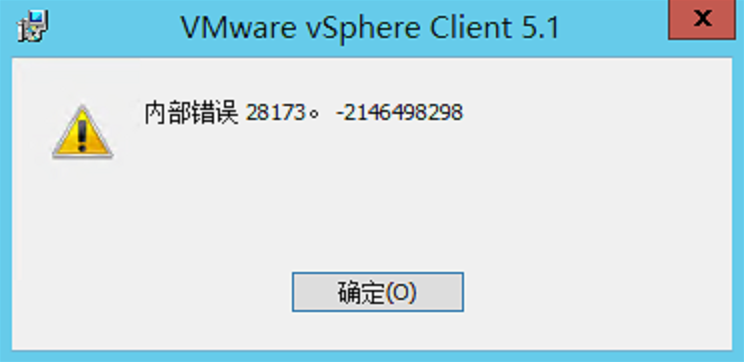
这是因为windows 2012中默认没有安装
通常情况下可以使用fdisk、df等命令查看硬盘的分区情况以及当前已使用空间大小、剩余空间大小等信息。但是如果要查看硬盘的硬件信息如 硬盘型号、序列号、已运行时间等信息该用什么工具查看呢?
在Linux下可以使用hdparm工具查看硬盘的相关信息或对硬盘进行测速、优化、修改硬盘相关参数设定。我主要常用这个工具来测试硬盘速度。
hdparm(hard disk parameters)
功能说明:显示与设定硬盘的参数。
该命令用来获取或设置SATA/IDE设备的参数。注意了,既可以获取也可以设置,所以使用这个命令的时候务必要小心。当然我们只是为了获取查看硬盘信息,故不会对硬盘及系统造成什么危害。通常会配合 -i 或 -I(大写的i) 选项来取得硬盘的硬件信息。用法如下:
2.常用指令
a.安全擦除
hdparm –user-master u –security-set-pass PASSWORD /dev/sda 设置密码
hdparm –user-master u –security-erase PASSWORD /dev/sda 安全擦除
类似安全擦除:
hdparm –yes-i-know-what-i-am-doing –sanitize-crypto-scramle /dev/sdx
hdparm –yes-i-know-what-i-am-doing –sanitize-status /dev/sdx
b.设置硬盘容量(硬盘必须直连服务器,通过raid卡无法执行此项指令)
yum install sg3_utils.x86_64
sg_readcap /dev/sdb
hdparm -N VP –yes-i-know-what-i-am-doing /dev/sdb (VP: certain LBA blocks)
c.解锁
hdparm –user-master u –security-set-pass PASSWORD /dev/sda
hdparm –user-master u –security-unlock PASSWORD /dev/sda
hdparm –user-master u –security-disable PASSWORD /dev/sda
d.升级固件版本
hdparm –fwdownload /root/Desktop/xxx.bin –yes-i-know-what-i-am-doing –please-destroy-my-drive /dev/sdc
————————————————
hdparm -I /dev/sda
语法:hdparm [-CfghiIqtTvyYZ][-a <快取分区>][-A <0或1>][-c ][-d <0或1>][-k <0或1>][-K <0或1>][-m <分区数>][-n <0或1>][-p ][-P <分区数>][-r <0或1>][-S <时间>][-u <0或1>][-W <0或1>][-X <传输模式>][设备]
参数说明:-a<快取分区> 设定读取文件时,预先存入块区的分区数,若不加上<快取分区>选项,则显示目前的设定。-A<0或1> 启动或关闭读取文件时的快取功能。-c 设定IDE32位I/O模式。-C 检测IDE硬盘的电源管理模式。-d<0或1> 设定磁盘的DMA模式。-f 将内存缓冲区的数据写入硬盘,并清楚缓冲区。-g 显示硬盘的磁轨,磁头,磁区等参数。-h 显示帮助。-i 显示硬盘的硬件规格信息,这些信息是在开机时由硬盘本身所提供。-I 直接读取硬盘所提供的硬件规格信息。-k<0或1> 重设硬盘时,保留-dmu参数的设定。-K<0或1> 重设硬盘时,保留-APSWXZ参数的设定。-m<磁区数> 设定硬盘多重分区存取的分区数。-n<0或1> 忽略硬盘写入时所发生的错误。-p 设定硬盘的PIO模式。-P<磁区数> 设定硬盘内部快取的分区数。-q 在执行后续的参数时,不在屏幕上显示任何信息。-r<0或1> 设定硬盘的读写模式。-S<时间> 设定硬盘进入省电模式前的等待时间。-t 评估硬盘的读取效率。-T 平谷硬盘快取的读取效率。-u<0或1> 在硬盘存取时,允许其他中断要求同时执行。-v 显示硬盘的相关设定。-W<0或1> 设定硬盘的写入快取。-X<传输模式> 设定硬盘的传输模式。-y 使IDE硬盘进入省电模式。-Y 使IDE硬盘进入睡眠模式。-Z 关闭某些Seagate硬盘的自动省电功能。
hdparm常用参数使用举例:
1、显示硬盘的相关设置:
[root@oracle ~]# hdparm /dev/sda
/dev/sda:
IO_support = 0 (default 16-bit)
readonly = 0 (off)
readahead = 256 (on)
geometry = 19929[柱面数]/255[磁头数]/63[扇区数], sectors = 320173056[总扇区数], start = 0[起始扇区数]
2、显示硬盘的柱面、磁头、扇区数:
[root@oracle ~]# hdparm -g /dev/sda
/dev/sda:
geometry = 19929[柱面数]/255[磁头数]/63[扇区数], sectors = 320173056[总扇区数], start = 0[起始扇区数]
3、测试硬盘的读取速度:[root@oracle ~]# hdparm -t /dev/xvda
/dev/xvda:
Timing buffered disk reads: 422 MB in 3.01 seconds = 140.20 MB/sec
[root@oracle ~]# hdparm -t /dev/xvda
/dev/xvda:
Timing buffered disk reads: 408 MB in 3.01 seconds = 135.59 MB/sec
[root@oracle ~]# hdparm -t /dev/xvda
/dev/xvda:Timing buffered disk reads: 416 MB in 3.01 seconds = 138.24 MB/sec
4、测试硬盘缓存的读取速度:[root@oracle ~]# hdparm -T /dev/xvda
/dev/xvda:
Timing cached reads: 11154 MB in 1.98 seconds = 5633.44 MB/sec
[root@oracle ~]# hdparm -T /dev/xvda
/dev/xvda:
Timing cached reads: 10064 MB in 1.98 seconds = 5077.92 MB/sec
[root@oracle ~]# hdparm -T /dev/xvda
/dev/xvda:Timing cached reads: 10600 MB in 1.98 seconds = 5351.73 MB/sec
5、检测硬盘的电源管理模式:
[root@oracle ~]# hdparm -C /dev/sda
/dev/sda:
drive state is: standby [省电模式]
6、查询并设置硬盘多重扇区存取的扇区数,以增进硬盘的存取效率:
[root@oracle ~]# hdparm -m /dev/sda
[root@oracle ~]# hdparm -m 参数值为整数值如8 /dev/sda 附:硬盘坏道修复方法
检查:smartctl -l selftest /dev/sda
卸载:umount /dev/sda*
修复:badblocks /dev/sda
On an HPE Gen8-series or HPE ProLiant Gen9-series servers with HPE Integrated Lights-Out 4 (iLO 4), the NAND flash device may not initialize or mount properly, which may cause a variety of symptoms, which are listed below:
AHS Errors
Embedded Media Errors
Intelligent Provisioning Errors
OneView Errors
Any HPE ProLiant Gen8-series or HPE ProLiant Gen9-series server running iLO 4.
The resolution for this issue may take several steps that need to be completed in the order specified below.
OVERVIEW
Step 1) Upgrade the iLO 4 firmware to version 2.61
Step 2) Perform a NAND format
Step 3) Check the iLO status If the iLO status is normal, then skip to Step 6 If the iLO status is still degraded, continue to Step 4
Step 4) Schedule downtime; AC power-cycle and repeat the NAND format
Step 5) Check the iLO status If the iLO status is normal, continue to
Step 6 If the iLO status is still degraded, then skip to Step 7
Step 6) Perform these final steps if the system board does not need to be replaced: Reboot the server; reinstall IP; and refresh the server in OneView (if server is managed by OneView)
Step 7) If steps 1-4 did not resolve the degraded iLO, replace the system board.
Note: The 2.61 iLO 4 firmware is a critical update. As such, HPE requires users to update to this version immediately. Install this update to take advantage of significant improvements to the write algorithm for the embedded 4 GB non-volatile flash memory (also known as the NAND). These improvements increase the NAND lifespan.
Additional considerations before performing a NAND format
A NAND format can be performed while the server is online in most cases.
Exception: For ESXi hosts booting from the Embedded SD Card – it isstrongly recommended to perform the NAND format with the ESXi OSshutdown.This recommendation also applies when updating the iLO 4firmware or resetting the iLO for ESXi hosts booting from the Embedded SDCard
A server AC power removal may be required (prior to the NAND format) in order for the NAND format to be successful. This can be accomplished for ML or DL servers by shutting down the server and disconnecting the power cables for a few seconds. For blade servers, an E-fuse can be accomplished by logging into the OA CLI and typing “reset server #” where “#” is the bay number of the blade.
An AuxPwrCycle feature was added in iLO 4 firmware version 2.55 so that the equivalent of an AC power removal can be performed remotely on a server.
Refer to Customer Notice “HPE Integrated Lights Out (iLO) 4 – RESTful Command to Allow an Auxiliary Power-Cycle Is Available in Firmware Version 2.55 (and Later)” located at the following URL:
Required steps to perform after a successful NAND format
Detailed steps
Step 1. Upgrade the iLO 4 firmware to version 2.61. To download the firmware. The latest version of the iLO 4 firmware is available as follows:
Note: For ESXi hosts booting from the Embedded SD Card (Gen8/Gen9)- it is strongly recommended to perform this step with the ESXi OS shutdown.
Step 2. Perform NAND format using one of the methods detailed in the customer advisory: using one of the methods detailed in the customer advisory: HPE Integrated Lights-Out 4 (iLO 4) – How to Format the NAND Used to Store AHS logs, OneView Profiles, and Intelligent Provisioning
Find the document at:
Note: iLO 4 firmware version 2.44 (or later) is required to format the NAND using the following steps.
Step 3. Check the iLO status using the options available in the customer advisory: HPE Integrated Lights-Out 4 (iLO 4) – How to Format the NAND Used to Store AHS logs, OneView Profiles, and Intelligent Provisioning (find the document at the link in Step 2).
If the iLO status is normal based on the above criteria, then skip to Step 6 If the iLO status is still degraded, continue to Step 4
Step 4. If the iLO status is still degraded, perform the following steps:
a) Schedule a maintenance window
b) Shut down the server
c) Perform an E-fuse (server blade) or AC Power Pull (DL / ML series servers) d) Perform the NAND format again (refer to the instructions in Step 2 above)
Step 5. Check the iLO status (refer to the instructions in Step 3 above)
If the iLO status is normal, continue to Step 6
If the iLO status is still degraded, then skip to Step 7
Step 6. Perform these final steps after the NAND format is successful:
a) Reboot the server
b) Reinstall Intelligent Provisioning (see additional details below)
c) If the server is managed by HPE OneView, perform a server refresh to bring the server back under management.
Note: Any existing errors in OneView will need to be marked as cleared after the refresh.
Step 7. If steps 1-4 did not resolve the degraded iLO, contact HPE support to arrange a system board replacement. Follow these steps to complete the remediation:
a) Open an HPE support case to arrange for a replacement system board / arrange a maintenance window
b) During the maintenance window, shutdown the server
c) Unassign the OneView profile (if the server is under OneView management)
d) Replace the system board
e) Enter Server Model and Serial Number via RBSU
f) Update to iLO 4 firmware 2.61 (or later)
g) Check iLO status (refer to Step 3 above)
h) Reassign the OneView profile (if the server is under OneView management)
Note: Any existing errors in OneView will need to be marked as cleared after the OneView profile is applied.
If additional assistance is needed, contact HPE support and reference Advisory a00019495en_us as follows:
Click on the following URL to locate the HPE Customer Support phone number in your country:
https://h20195.www2.hpe.com/v2/Getdocument.aspx?docname=A00039121ENW .
OneView Considerations
OneView relies on the NAND to be accessible to perform many operations such as adding a new server or applying a profile. Because of this there are several things that need to be understood when dealing with this issue in an OneView environment.
Reinstalling Intelligent Provisioning Considerations
There are online and offline options for reinstalling Intelligent Provisioning
Note: Intelligent Provisioning version 3.x is for HPE ProLiant Gen10-series servers only.
Offline method considerations:
Reference:
https://support.hpe.com/hpsc/swd/public/detail?swItemId=MTX_170e0ac3cb6e4439bf313f137a#tab3
Note: The DVD can be used multiple times.
Please note the Intelligent Provisioning Recovery Media DVD may be remotely mounted using HPE Integrated Lights-Out 4 (iLO 4) Virtual Media functionality, in order to reinstall Intelligent Provisioning. Additional information is available in the HPE iLO 4 User Guide at the following URL regarding how to mount an ISO image (federated or un-federated) and perform basic virtual media operations. Reference Pages 189 and 223-237:
HPE iLO 4 User Guide:
https://support.hpe.com/hpsc/doc/public/display?docId=emr_na-c03334051-16
In addition, it is possible to write a script that utilizes HPE Integrated Lights-Out 4 (iLO 4) to reinstall Intelligent Provisioning on multiple servers. HPE Lights-Out management processors support an advanced scripting interface for group configuration and server actions. Scripts would need to be customized for the specific environment and task. Sample scripts are available for customers to reference at the following URL: HPE Lights-Out XML Scripting Sample for Windows: https://support.hpe.com/hpsc/swd/public/detail?swItemId=MTX_459b8adc29c04317ad1d6a6752
Intelligent Provisioning software download links
HPE ProLiant Gen8-series servers are only supported with Intelligent Provisioning 1.x
HPE ProLiant Gen9-series servers are only supported with Intelligent Provisioning 2.x
a.) Linux RPM located at the following URLs: For HPE Gen8-series servers: http://downloads.linux.hpe.com/SDR/repo/ip/rhel/current/x86_64/gen8/
For HPE Gen9-series servers: http://downloads.linux.hpe.com/SDR/repo/ip/rhel/current/x86_64/gen9/firmware-intelligentprovisioning-ip-2.71-1.1.x86_64.rpm
b.) The Windows files are located at the following URLs:
For HPE ProLiant Gen8-series servers: Intelligent Provisioning for Microsoft Windows 64-bit Operating Systems 1.64.0.0 (2 Mar 2017) cp031302.exe https://support.hpe.com/hpsc/swd/public/detail?swItemId=MTX_01b900175afc4ae68be6c87b39
For HPE ProLiant Gen9-series servers: Intelligent Provisioning for Windows x64 2.50.0.0(6 Jan 2017) cp031091.exe https://support.hpe.com/hpsc/swd/public/detail?swItemId=MTX_b031497eafd94b9ea2156cdef6
c) ISO images (e.g. for VMware) on Hewlett Packard Enterprise Support Center located at the following: https://support.hpe.com/hpesc/public/home/driverHome?sp4ts.oid=1008862660
For HPE ProLiant Gen8-series servers: Intelligent Provisioning Recovery Media, version 1.70(9 Oct 2017)
For HPE ProLiant Gen9-series servers: Intelligent Provisioning for Gen9 Servers, version 2.70(b)(28 Feb 2018)
棋局如人生,稳得住的人才能收获最后的成功,反之,只会在无限追悔里懊恼不已。
情绪谁都会有,而真正情商高的人,一定是能控制自己情绪的人。
我们常常会有这样的经历:明明很想好好说话,却忍不住开口就怼;明明需要早些休息,保持充足的精神面对第二天的会议,却在床上翻来覆去睡不着;明明知道对方不是故意犯错,却还是要指责……
情绪不是生活的全部,但情绪却能左右我们全部的生活。
一个人的情绪,就跟人的外表一样,也是一张名片。情绪不稳定不仅会伤身,也更有可能伤害身边人,伤害人际关系。
当你的情绪不受大脑控制的时候,有个特别有效的方法:先深呼吸60秒,再想想可能的最坏结果,或者赶紧停下,换个环境,冷静了再来处理事情。
简单事不争吵,复杂事不烦恼,发火时不讲话,生气时不决策。
做到这些,才不会成为情绪的奴隶。
有句话说得好:“我们曾如此渴望命运的波澜,到最后才发现,人生最曼妙的风景,竟是内心的淡定与从容。”
人生的波澜并不总是轰轰烈烈地到来,更多的是以一种磕磕碰碰的姿态渗透在生活里。
没带伞时一场意外的暴雨、急着赴约却遇上长长的堵车、与他人之间不经意的争执、一份不合口味的饭菜、太晚回家时家人等待许久的一场怨气……
三天一小打、五天一大闹,用来形容生活中预料之外的小事故,也再合适不过了。
这种时候,要做的、也最适合做的就是:稳住心绪,淡定面对。
风雨来了,那便看看雨中的风景;被堵路上了,那便听一段动人的广播;与人争执了,就当是接受了不同的建议,增长了见识;饭菜不合口,就少吃一点,当是保持身材。
家里人有了怨气,那是因为在乎,所以正好利用这个机会交流一下,增进感情。
心态稳得住的人,往往能把生活里的“事故”变成丰富人生的阅历,在一路泥泞里种出美丽的花。
生活里,我们所面对的每一件事,其实都是人生的一个考验,能不能迈过去,心态最重要。
把每一步走稳了,走妥当了,才能走到心中想去的目的地,才能得到心中想要的结果。
生活中,有很多这样的情况:突然接到临时的事务要出门,本来该准备的东西都已经整理好,却在匆忙中把身份证遗忘在桌子上,最终要用时只能自责不已。
看到孩子站到凳子上拿零食,手快要碰到旁边的热水壶,情急之下大喊一声,结果孩子一被吓,直接摔下来磕破了头。
手头上的事情越积越多,这也赶不及那也赶不及的,越着急完成,越集中不了注意力,最后陷入狂躁,什么都没完成。
做事情稳不住,就像人神经里隐藏的定时炸弹突然爆炸,威力惊人而后果往往也很严重。
这种时候,如果大脑能够下达一个指令:急什么!别慌,稳住!人的大脑很快便能恢复清醒,然后冷静下来思考对策和做出准确的行动。
生活里,我们总会遇到大大小小的事情。很多时候,事情本身并不严重,有时我们的慌乱反而会将它夸大。
稳,是一种生活状态;而稳得住,是人生的一种高度。
从今天起,遇到烦心事时,不妨在心里默念一下:稳住!用一颗清醒的头脑,去面对生活的纷纷扰扰。
我们来看一组问题:
为什么麦当劳做牛肉?
为什么肯德基做鸡肉?
为什么华莱士做全鸡?
这是一个战略问题。
我们讲过,战略有十大学派,回顾一下:
设计学派、计划学派、定位学派、企业家学派、认知学派、学习学派、权力学派、文化学派、环境学派、结构学派。
其中,迈克尔·波特的定位学派,把战略分成了三个基本选项。
他说,战略只有三种:
总成本领先,差异化,聚焦。
你选其中任何一个,就叫做定位。
今天我们来聊聊。
— 1—
总成本领先战略
第一名,只有一个战略:总成本领先。
什么意思?
总成本领先,听上去很简单啊,不就是低价,搞价格战吗?
其实不是。
价格战打到最后,结果通常是大家都降价,大家都不赚钱。
而大家都降价,你却能赚钱,这才是你的战略优势。
为什么你能赚钱?
你是老大,你占领了最大的市场份额。
这个份额,让你的固定成本摊薄下来,加上运营效率高,那你的总成本相对于别人来说,是领先的。
哪怕降价,你也具有规模所带来的总成本优势,别人成本高没得赚,你却可以。
获得总成本优势之后,可以把其他的选手挤出主流市场。
因为份额本身,就是你的护城河。
总成本领先,指的并不是从价格领先,低价格从来都不是竞争优势,低成本才是。
第一名要想做的足够大,那你的覆盖面、你的量就得足够大。
量足够大的时候,你所覆盖的群体差异性就要相对小,你才能覆盖足够大的面。
而且,覆盖的群体要足够的下沉,你才能覆盖足够大的面。
这时,成本就变得很重要。
所以,几乎每一个行业里面第一名的企业,几乎都是用总成本领先的策略。
— 2 —差异化和聚焦战略
那,第二名怎么办?
第二名用差异化的战略。
差异化就是,我跟你(老大)做的不一样。
你做什么面膜,我就做另外一种面膜。你做便宜,我就做好看,这就叫差异化。
比如在锂电池行业,老大是宁德时代,已经有老大了,你的战略就不应该跟他比规模、比成本了。
他因为规模带来的成本优势,你没法和他抗衡。
同样是做锂电池,你做动力电池,那我就不做。我做储能电池。
我要做一个你看不起的领域。就是以你的规模,一做就亏就领域。
如果你能做几百亿,那我就找整个行业可能才几十亿规模的。总的行业就这么大,你看不起,就不会进入。
我不进入你的战场。
我乐橱柜做高端定制的橱柜,就是选择了差异化战略。
我的产品就是做的你在市面上找不到。找不到就稀缺,稀缺就有定价权。
那他怎么来建立差异化呢?
用设计感来建立。
我的产品就是好看,比你的好看,跟其他门店的都不一样。你要买,只能在我这儿买到。
可是,其他店看见了,可以“抄”啊,抄款式。
对,你可以抄。
但是,“抄”完之后,真正在生产线做出来,它是有一个周期的。
在家具行业,这个周期可能是半年或者一年。
于是我乐橱柜,就希望把自己的能力建立在,我的所有产品,两年必须下架。
这其实是在倒逼自己,建立快速设计和制造大量新产品的能力。
让别人一抄,就比你落后半年到一年。一抄就落后。
等你“抄完”之后,我下一代产品都出来了。
反过来,你的店铺产品始终比别人领先一年到半年。
只有打“快”这条路线,才能用设计这个维度去领先。
这时,差异化的优势就一直保持。
到最后,差异化的目的是无从比较。
一旦无从比较,就会带来一个结果:我稀缺,我就有定价权。
聚焦战略,很好理解,意思是做区隔市场。
聚焦一个特殊的领域、特殊的区隔市场,让它成为你的优势,别人打不进来。
老大之外,聚焦也是可以选择的战略。
— 3 —
做哪个市场的生意?
思考老大和老二的战略问题,其实同时是在思考你要在哪个市场来做生意。
市场有五大类:大众市场、利基市场、区隔化市场、多元化市场、多边平台或多边市场。
老大,通常做的是大众市场的生意。
因为真正大众市场的需求,通常都是简单的、重复的,比较的是性价比、基本款之类的能力。
那么,大众市场往后做,除了因为一些区域的分隔的原因,做到最后,就会被一些公司把这些基本需求集中起来。有些公司就做的特别大。
比如手机市场的大头,就是被几家大公司分掉的。
大家都想做大众市场的生意,大众意味着这是一块大蛋糕。
但是,市场远不止这一个。
第二名的选择有很多,比如利基市场。
利基市场,是一个非常重要的差异化市场。
利基这个词是来自于一个法语单词,niche。这个单词是神龛的意思。
我们想象一下,在墙上挖一个小洞,把圣母玛利亚,那个神,供奉在这个小洞里面。
我们用利基这个词,来形容市场,意思就是在一个墙面上,挖个小缝,里面都有一个小市场。
在一个巨头已经确立的行业里,想要获得成功,就需要做利基市场。
微软的办公软件office,可以说是极其庞大的功能,把大家能想到、用到的所有功能,都集合起来了。
大部分人可能只用了其中5%的功能,另外95%是为了总有人能用到。
而今天,有一个网站叫石墨,我用了之后,觉得真好用。
我随时随地写东西,它是实时的,一秒都不落地同步到云端。
这样,我在手机端可以编辑,回到办公室也可以直接编辑。
就这个功能,真方便,让人离不开了。
从全部功能比较来看,石墨可能不如微软office。但只要有一个功能,能让用户满意,让用户爱上,就够了啊。
这个功能,就帮助石墨成功切入利基市场,拥有了一块市场份额。
所以说,第二名可以切入利基市场,来采取差异化战略。
认真思考不同市场有什么样的不同的战略来做生意。
最后的话
迈克尔·波特说:“不幸的是,往往在出现失败的时候,人们才会想起对战略的关注,我想真正的挑战是怎么让人们更重视战略,甚至在没有出现危机的时候。”
降本增效,创业创新,都需要“战略眼光”。
行业第一名,总成本领先是根本战略;
差异化战略,永远是为第二名准备的。
几乎所有行业的第一名,你必须要投入,这条路可能很苦,很困难,但这是走到第一名的必经之路。
第二名,就尽可能多的、采取各种各样的差异化路线。
每个生态位,都有自己的竞争优势。
找到自己的核心竞争力。
祝福。
文章来源:https://mp.weixin.qq.com/s/90oakGRGmdli85UjAIhbEA
建立并深化与消费者之间的相关人际关系已经成为市场营销行业的一项主要趋势和优先任务。技术增强了消费者的能力,提高了他们对跨多个平台的卓越客户体验的期望。这一转变使市场营销人员必须在个人、情感和文化层面上深刻理解消费者,以便从激烈竞争中脱颖而出并提供无摩擦的真实体验。
对企业而言,更重要的是,在人性层面上与消费者建立联系,这对于增加收入和推动长期增长至关重要。坦率地说,消费者现在希望他们所有的体验都能实现个性化,以满足他们的独特需求和期望。 真正理解这种联系的市场营销人员将建立一种持久的忠诚,带来更多回头客;同时树立品牌价值,继续吸引新客户。
与消费者建立持久联系需要深入了解消费者,需要市场营销人员通过以下方式进行沟通:
例如,宝洁(Procter & Gamble)公司致力于与客户大规模建立一对一关系。这家消费品巨头正在分析行为层面的数据,并利用人工智能来识别行为驱动的受众模式。这有助于宝洁公司建立基于行为的微细分市场,而不是典型的媒体购买受众(25岁到 54岁之间的人群)。他们指出,智能目标定位已使其公司的收入增加了 20%。
强调包容性和多样性是市场营销人员在人性层面与消费者建立联系的另一种方式。零售业巨头 Target 就是致力于实现包容性的众多企业之一,该公司销售面向残疾儿童的日常服装和万圣节服饰。此外,还有一家快餐连锁店 Dunkin’,该店最近在其芝加哥地区的店铺中推出了“每日超值菜单”,旨在为低收入顾客群体提供服务。
“市场营销在塑造人们的思维方式方面具有得天独厚的优势,我们应该利用这种优势来创造积极的变化”,Female Quotient(一家致力于促进职场性别平等的初创公司)首席执行官兼创始人 Shelley Zalis 在 AdAge 中写道。“这不仅在于确保广告宣传中包含不同种族、不同性别和不同年龄段的人士;还在于确保以公平、准确和真实的方式来描绘各种各样的人士。”
今年,美国广告主协会(ANA)发起了 #SeeAll 倡议来支持包容性。在最近的 ANA 营销大师会议上,商业顾问兼著者 Rishad Tobaccowala 要求与会者组建的团队包含不同肤色和不同种族的成员,而且他们还要具备不同的观点。
与那些只注重交易行为的品牌相比,打造无摩擦、个性化体验的品牌能够更有效地提升忠诚度和终身价值。成功做到以消费者为中心意味着专注于长期的终身价值,而不是短期的临时销售,这种战略更有利于品牌实现业务增长。
鉴于人的大多数决定都是根据内心而不是大脑做出,因此以新颖有趣的方式与客户建立联系,不仅仅专注于单纯的交易,而是创造令人难忘的体验,这一点非常重要。
要交付真实的体验,首先要拥有正确的数据。这意味着不仅仅要关注来自销售、制造和供应链等来源的运营数据 — 关键在于通过情感分析和情绪分析从各种来源(产品评论、服务评级、与客户支持的互动、调查反馈、社交媒体帖子和喜好等)收集洞察。能够窥见消费者的感受、恐惧和渴望的数据是品牌能够构建故事和改善消费者体验的基础。 需要将大数据与人类同情心相融合。 百事 (PepsiCo) 公司将这种新的消费者洞察方法称为人文科学,即定量层面上的规模数据与真实人性层面上的故事深度相结合。
在人性层面上建立联系需要构建有说服力的故事。他们必须融入与文化相关的独特创意,并且需要通过幽默、情绪或音乐手段来激发情感。许多品牌故事营销活动已经成功地在人性层面上吸引了受众。这里提供三个示例,并介绍每个示例用于与消费者建立联系的故事讲述基本元素。
宝洁公司与 Peyton Manning 合作的“汰渍周日洗衣之夜”系列广告通过笑声和共同经历与观众建立联系:一件可怕的家务洗衣和对美国橄榄球的热爱。这些汰渍广告之所以能起作用,一方面因为它们很有趣,另一方面还因为 Peyton Manning 尽管是一名著名运动员,但却带着一种“普通人”的气质。在这则广告中,Manning 不仅谈论洗衣问题,而且还前往了超市。再也找不到比这更日常的广告了,这就是这些有趣的广告能够引起观众共鸣的原因(他们甚至可能在观看广告时正在洗衣服)。
英国鞋类和眼镜零售商 TOMS 通过其自身的起源故事从情感层面上吸引了消费者。在该故事中,创始人 Blake Mycoskie 立志创办了这样一家公司:“买一双鞋就送一双新鞋给需要的孩子。”该品牌通过为消费者提供帮助世界各地儿童的机会,深化了这种联系。TOMS 已经将其“买一捐一”计划推广到了太阳镜业务,买一副太阳镜,该公司就帮助一位视力受损的人恢复视力。通过提供基于人类同情心和助人为乐愿望的合作关系,TOMS 不仅满足了强烈的情感需求,而且让客户在其企业故事中充当了角色。
耐克 (Nike) 公司与 Colin Kaepernick 合作的“Just Do It”广告可能已有一年时间,但它传递了一个深刻而有价值的信息,在逆境中追求梦想,就这一点而言它是永恒的。尽管 Kaepernick 对很多人来说仍是个有争议的人物,但这则广告并没有提到这位前 NFL 四分卫在播放国歌时跪在场边。相反,它侧重的是经常遇到挑战的普通人,他们追求卓越并完全相信某件事,即使这意味着要牺牲一切。这是与耐克口号“Just Do It”建立联系的有力信息。
引人入胜的故事讲述还可以利用惊喜和愉悦,让消费者保持快乐和参与其中。品牌可以利用这些策略以各种新颖方式满足消费者的需求。例如,在 NBA 总决赛期间,每当广播员说到“免费”这个词时,Chipotle 就为在 Twitter 上关注它们这家墨西哥餐厅连锁店以及向热线发送字母数字代码的前 100 名用户提供免费的墨西哥卷饼。这个促销活动为该品牌赢得了超过 10 亿人次的印象。
当消费者需要个性化的体验时,市场营销人员必须利用工具和策略在人性层面上将自身与客户联系起来,从而建立持久的关系和牢固的品牌忠诚度。这样,他们将为强劲的业务增长奠定基础。
本文来自IBM